SmartSearch AI
The agentic AI search platformwith Aura, your built‑in AI search expert
Aura, the Adaptive Unified Retrieval Agent, sets up and tunes search in plain language, so your people and your AI agents get permission-aware search and cited answers across websites, documents and business systems.
 Project
  Back to Aura
User Guide
API DocsA
Back to Aura
User Guide
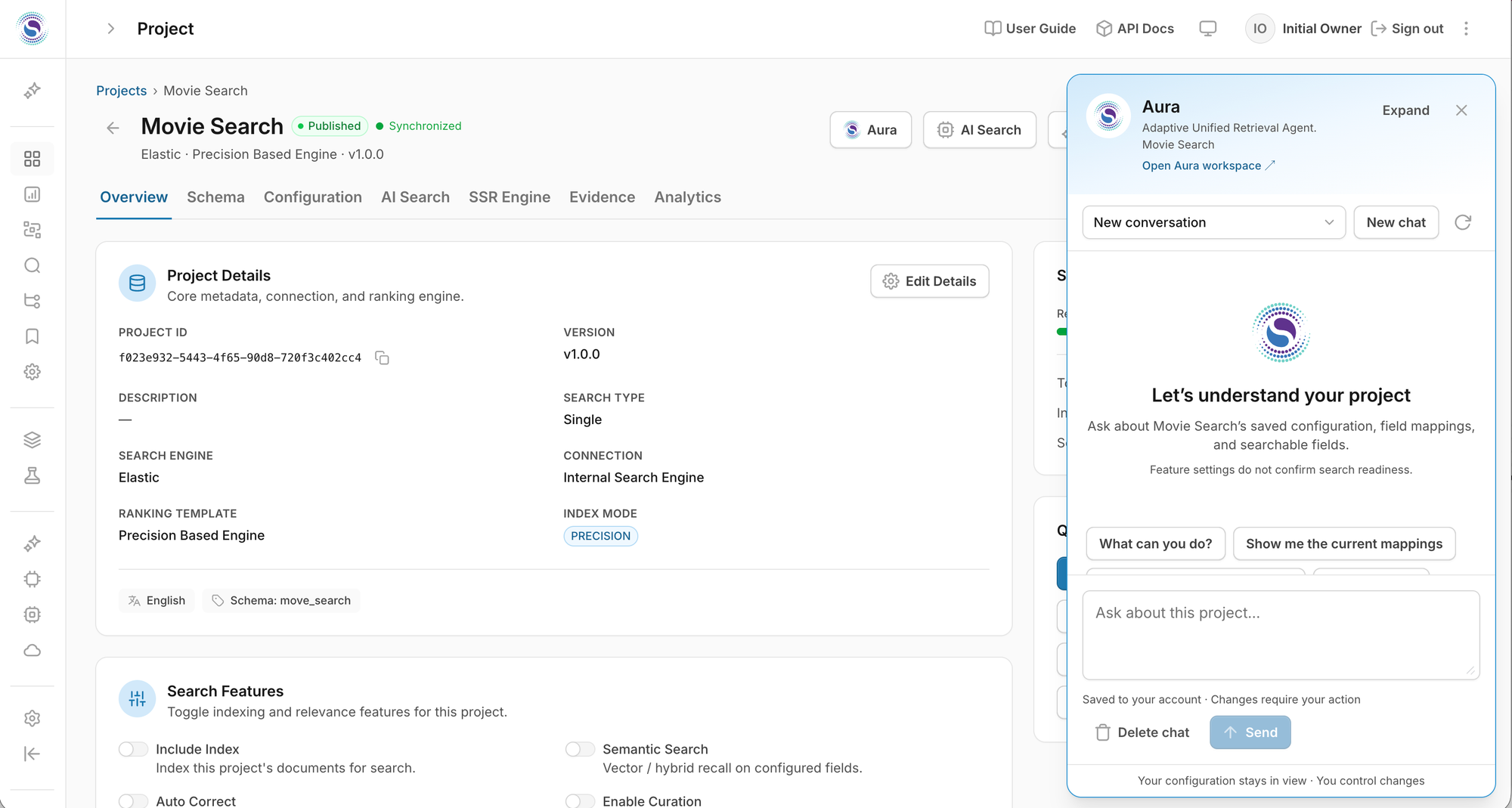
API DocsA Projects › Product Catalog
Product Catalog Published
Aura
AI Search OpenSearch · Ranking Engine v2 · v4
OverviewSchemaConfigurationAI SearchSSR EngineAnalytics
Project detailsCore metadata, connection, and ranking engine.
- Search engine
- OpenSearch
- Version
- v4
- Ranking template
- Ranking Engine v2
- Index mode
- PRECISION
- Description
- Primary commerce catalog with hybrid relevance and semantic recall across the storefront search experience.
Illustrative example
Search teams at these companies have worked with the SmartSearch team











One platform for search, answers and agents.
Permission-aware retrieval across everything your people use, cited answers they can verify, and an expert assistant that keeps it tuned.
-
Aura
Set up and tune search in plain language. Every change is reviewed and approved.
Learn more -
Cited answers
Search, Chat and Agentic modes answer only from your sources, with citations.
Learn more -
Permission-aware
SSO, document-level access and guardrails apply before the model sees any text.
Learn more -
Smart Connectors New in 4.7
Websites, SharePoint, Google Drive, Confluence and more, kept in sync.
Learn more
Search expertise you can talk to.
Describe what people should find, or what is going wrong, in plain language. Aura reads your real projects and settings, explains what is happening, and prepares the exact change. Nothing changes until you approve it.
- Set up
- Start a project from a plain description, choose searchable fields, turn on semantic and hybrid search.
- Tune
- Field weights, boosts and burials, popularity and freshness. Draft it, test it, publish it.
- Explain
- Usage, zero-result searches and trends, with up to three testable ideas and their tradeoffs.
- Hand off
- Answers product questions, explains the query language and Java SDK, guides teams through sources and endpoints.
- Chat never edits configuration. Every change goes through a review screen and an explicit approval.
- Aura only reads what you are allowed to see, and checks your access again before any change.
- Aura uses the model connection you choose, with encrypted credentials, separate from the models that power search.
Answers people can check, not just trust.
Search, Chat and Agentic modes write responses only from retrieved sources. Every statement links back to the page or document it came from, and the assistant says so when the evidence is not there.
- Search · Chat · Agentic modes
- Inline numbered citations
- Multi-turn memory
- Spanish questions, English sources
HR assistant How many weeks of paid parental leave do full-time employees get?
Full-time employees receive 16 weeks of paid parental leave, available to all parents after 90 days of employment1. Leave can be taken in up to two blocks within the first 12 months2.
- 1 Employees
Parental Leave Policy
SharePoint · HR Policies
Eligible full-time employees receive 16 weeks of paid parental leave after completing 90 days of service.
- 2 Employees
Employee Handbook 2026, section 4.2
Confluence · People Ops
Parental leave may be taken in up to two blocks within twelve months of the birth or placement.
Does this apply to contractors?How do I request leave?
Ask a follow-up…
Illustrative example
Every answer respects who is asking.
Single sign-on identifies the person, document permissions apply before the model sees any text, and layered guardrails screen what goes in and out. Evidence Mode keeps a tamper-evident record of how each answer was produced.
- SAML 2.0 · OpenID Connect
- ACLs by user, group, role, key
- Safety, PII, injection, secrets
- Evidence Mode record
Answer record Signed
- Visitor
- Signed in · employee
- Sources used
- 2 of 14 retrieved
- Access check
- Passed for both
- Input screen
- Allowed
- Output screen
- Allowed
- Configuration
- hr-assistant · v42
- Record
- Signed · tamper-evident
Illustrative example
Your websites and documents, kept current.
Smart Connectors crawl the sites you choose and sync repositories on a schedule. Changed pages are re-indexed, removed pages drop out, and SharePoint permissions follow the content.
- Public websites
- SharePoint · OneDrive
- Google Drive · Confluence
- Amazon S3 · GitHub
| Source | Items | Status |
|---|---|---|
| Department website | 1,208 pages | Completed |
| SharePoint policies | 412 docs | Completed |
| Google Drive FAQs | 96 files | Syncing |
Permission sync every 15 min · Current
Illustrative example
How SmartSearch AI works.
One question becomes a cited, permission-aware answer in five governed steps. SmartSearch includes its own search engine or sits as a thin retrieval layer on a cluster you already run.
Visitors and agents
- WebsitesWordPress, site-wide
- Portals & appsREST & streaming
- AI assistantsMCP and A2A
- Teams and SMSVia integration
asksreply
SmartSearch AI Release 4.7
- REST API
- Streaming
- MCP server
- A2A
- 1 IdentifySSO, ACL scope
- 2 ScreenInput guardrails
- 3 RetrieveHybrid + rerank
- 4 GenerateYour chosen LLM
- 5 CiteInline citations
- WorkspacesDepartment bots, isolated or shared Federated, IT oversight
- AI SpiceSelf-tuning within admin safety rails Learns from real queries
- Evidence ModeSigned record of every answer Replayable, auditable
evidence ⇄ draft
reads
approved
OpenAI · Azure OpenAI · Claude · Gemini · Bedrock · Mistral · Cohere · Groq · OpenRouter · Self-hosted models
uses your model
AuraAsk in plain language Adaptive Unified Retrieval Agent
- Sets up projects and fields
- Tunes relevance and ranking
- Explains analytics
- Prepares reviewable changes
You approve every change
- Kubernetes · Docker
- AWS · DigitalOcean
- On-premises
- Installed by Weblink
permission-filtered queries
- Public websites
- SharePoint · OneDrive
- Google Drive · Confluence
- Amazon S3 · GitHub
- Uploads · bulk API
- Database change capture
sync
SmartSearch retrieval layerone query language, permission filters, hybrid fusion
- Elasticsearch / OpenSearchBuilt in, or connect your existing cluster
- Vector databaseOptional Roadmap
index + permissions
Smart ConnectorsScheduled sync, change and removal detection, SharePoint permission syncNew in 4.7
A question enters on the left, passes five governed steps, and returns as a cited answer. SmartSearch includes a search engine or connects to yours, reads only what that person may see, and records every answer. Aura is the control point: admins describe what they want, and approved changes flow into the platform.
- New in 4.7
- Via integration
- Roadmap
Your model. Your cloud. Your data.
Bring the LLM you already trust and keep indexes, vectors and conversations in your environment.
Your model
OpenAI, Azure OpenAI, Anthropic Claude, Google Gemini, Amazon Bedrock, Mistral, Cohere, Groq, OpenRouter or a self-hosted model, with your own keys. Content goes only to the model you configure and is never used for training.
Your cloud
A search engine is included, or connect the Elasticsearch or OpenSearch you already run with no data migration. Weblink installs and tunes it in your cloud or data center as part of a search consulting engagement.
Installed and tuned by the engineers who built it.
Weblink Technologies installs SmartSearch AI in your cloud or data center and tunes it with your team as part of a search consulting engagement.
Book a SmartSearch AI demo- building Elasticsearch and OpenSearch solutions
- 13+ yrs
- enterprise search engagements delivered by Weblink
- 75+
- official partner with reseller capabilities
- Elastic
What enterprise teams ask first.
What is Aura?
Aura, the Adaptive Unified Retrieval Agent, is SmartSearch AI's built-in search expert. Admins and developers describe goals in plain language; Aura reads the real configuration, explains it, and prepares exact changes that take effect only after someone approves them.
Do we need our own Elasticsearch or OpenSearch?
No. SmartSearch AI includes a search engine. Teams that already run Elasticsearch or OpenSearch can connect it instead and keep their existing indexes.
Where does our data live?
In your environment: the built-in engine deployed in your cloud or on-premises, or your existing cluster. Indexes, vectors, permissions and conversation records stay yours and can be exported through the APIs.
Is our content used to train AI models?
No. Content and conversations go only to the LLM provider you configure, under that provider's no-training terms, or to a self-hosted model.
Can each department run its own assistant?
Yes. Workspaces give each department its own assistants, content, analytics and transcripts, with knowledge isolated or shared and central IT oversight across all of them.
How do we get it?
Weblink Technologies installs SmartSearch AI in your cloud or on-premises and tunes it with your team as part of a search consulting engagement. Start with a demo.
See SmartSearch AI on your own content.
A demo walks through Aura, cited answers and permissions on content like yours, and what an install looks like in your environment.